
Table of Contents
Choosing the right microscope interface in 2026 isn't just about cables, it's about whether your gear can keep up with your hands. If you have ever felt the frustration of a laggy screen while trying to solder a microscopic trace, you know that technical specs only matter if they work in real-time. This guide breaks down the critical differences between USB and HDMI setups to ensure your workflow stays fluid and your focus stays sharp
The HDMI Digital Microscope: Built for High-Speed Action
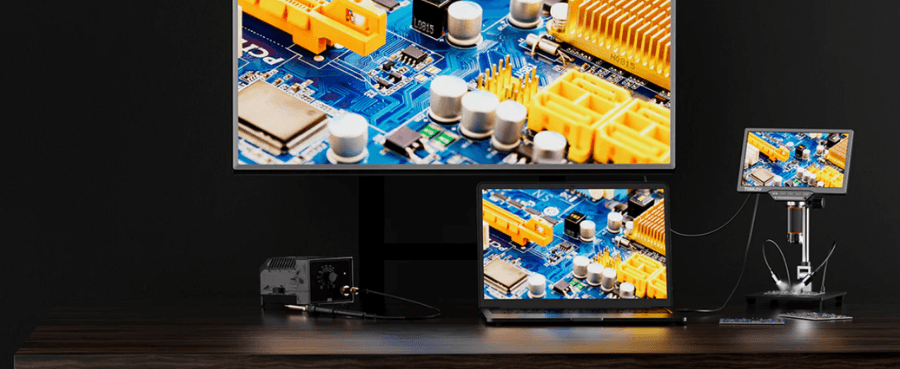
If your hands are physically under the lens—tweezing, soldering, or dissecting, HDMI microscopes remain the undisputed heavyweight champions in 2026. These systems are designed for one thing: the fastest possible visual feedback from the sensor to your eyes.
The Power of the Direct Pipe
An HDMI-based system is a standalone powerhouse. Unlike a peripheral that relies on a computer's processor, the camera handles the image internally and dumps it directly to your display. In 2026, the standard for professional work has moved to HDMI 2.1, which handles 4K resolution at 60Hz or even 120Hz with ease.
Why Professionals Choose HDMI
- Zero-Latency Performance: Because the signal bypasses the processing stack of an operating system, there is virtually zero delay. When you move a soldering iron, you see it move instantly.
- Standalone Simplicity: You don’t need a high-end laptop to run your station. A dedicated 4K monitor and the microscope head are all you need. This creates a crash-proof environment where no Windows updates will interrupt your work.
- Reliable Frame Rates: Since HDMI microscopes send uncompressed video signals, you don't suffer from the pixel mush or stuttering that can happen with USB streams during high-motion tasks.

The USB Digital Microscope: The Data-Logging Powerhouse
If your job is 20% looking and 80% documenting, a USB-C or USB 4.0 microscope is your most logical companion. In this setup, the microscope acts as a high-bandwidth sensor for your PC or Mac, relying on external software to bring the image to life.
The Software and AI Advantage
The magic of a USB system isn't just the lens; it's the software suite on your computer. By 2026, AI-assisted inspection has become a standard requirement for quality control labs and research facilities.
- Automated Measurements: USB software allows you to click-and-drag to measure microns, with data saved directly into a spreadsheet or PDF report.
- AI Defect Detection: Modern USB software can automatically highlight hairline fractures or count particulates, saving hours of manual labor.
- One-Cable Workflow: With USB 4.0, a single cable provides the data stream and the power for the microscope’s LED ring light.
Related Reading: Best Digital Microscopes for Soldering: Features to Consider
Head-to-Head: 2026 Comparison Matrix
| Feature | HDMI Microscopes (Standalone) | USB 4.0 / USB-C Systems |
|---|---|---|
| Primary Strength | Zero-lag, real-time feedback | Data analysis & AI software |
| Setup Complexity | Plug & Play (Monitor only) | PC-dependent (Requires drivers) |
| Recording Method | To internal SD Card | Directly to PC Hard Drive |
| Measurement Tools | Basic (On-screen overlays) | Advanced (AI-driven software) |
| Best Workflow | Manual repair & assembly | Quality control & Research |
| Reliability | Extremely High (No OS crashes) | Moderate (Subject to PC lag) |
Choosing the Best Setup for Your Bench
There is no universal winner, but there is a clear choice based on how you interact with your samples. The decision usually comes down to whether you are doing manual work or high-volume data collection.
Choose HDMI if You are a Builder or Repairer
If you spend your day with a soldering iron, hot air station, or tweezers in your hand, you should prioritize HDMI microscopes. The reaction speed of an HDMI 2.1 connection ensures that your tools and your vision stay in perfect sync. Even a 50ms delay—common in many USB processing setups—can cause you to overshoot a component or apply too much pressure. HDMI microscopes provide a live feel that is as natural as looking through traditional optical glass, but with the ergonomic benefit of a large 4K screen.
Choose USB if You are an Inspector or Researcher
If your goal is to find a problem, document it, and send a report to a client, a USB 4.0 system is the better choice. The ability to instantly save images to a synced cloud folder or use AI to count cell colonies is a massive productivity boost for documentation-heavy roles. While the latency is slightly higher than what you find in HDMI microscopes, it is perfectly acceptable for inspection where you aren't moving the sample rapidly.

Frequently Asked Questions
Can I use HDMI microscopes with my iPad or tablet?
Not directly. HDMI is an output signal, and most tablets only have inputs through specialized capture cards. For tablet use, a USB-C microscope is generally a better fit.
Does a 4K HDMI microscope work with a 1080p monitor?
Yes, but you are losing the detail you paid for. To truly see the benefit of HDMI microscopes, you should match your monitor’s resolution to the camera's sensor.
Why is HDMI considered more professional for soldering?
It comes down to frame rate consistency. A PC might drop frames if an update starts in the background, causing your screen to stutter. HDMI microscopes provide a dedicated, unshakeable 60fps stream that never wavers.
What is the maximum cable length?
HDMI is much more stable over long distances. You can run an HDMI cable 20–30 feet to a wall-mounted TV without any signal loss. USB 4.0 is usually limited to 3–6 feet before you need expensive active boosters.
Are HDMI microscopes more expensive?
Generally, yes. Because they require internal processing chips to handle the video signal without a computer, the initial hardware cost is higher than a passive USB sensor.
Final Thoughts
The USB vs. HDMI debate isn't about which cable is newer; it's about where you want the brain of your operation to live. If you want the brain in your hands and eyes, HDMI microscopes are the only way to go for that instant, lifelike connection. If you need a digital paper trail, USB is your tool. In 2026, the best microscope is the one that stays out of your way and lets the specimen take center stage.


Commenta
Nota che i commenti devono essere approvati prima di essere pubblicati.
Questo sito è protetto da hCaptcha e applica le Norme sulla privacy e i Termini di servizio di hCaptcha.