
Table of Contents
Microscope magnification can mean different things. On a compound microscope, it usually describes the enlargement produced by the objective and eyepiece. In a photograph or diagram, it compares image size with actual specimen size. On a digital microscope, it may describe how large the specimen appears on a particular screen.
These values are related, but they are not interchangeable. This guide explains the formulas, shows how to rearrange them and gives a reliable way to measure on-screen magnification.
Microscope Magnification Formulas

The three basic image-magnification formulas are:
Magnification = Image Size ÷ Actual Size
Actual Size = Image Size ÷ Magnification
Image Size = Actual Size × Magnification
Image size and actual size must use the same unit before you calculate:
-
1 millimeter (mm) = 1,000 micrometers (µm)
-
1 micrometer (µm) = 1,000 nanometers (nm)
Magnification is a ratio, so it has no measurement unit. Write the answer as 250×, not 250 mm or 250 µm.
What Does “Actual Microscope Magnification” Mean?
The phrase actual magnification can refer to different measurements depending on the microscope and the context:
-
Image magnification compares a measured feature in an image with the feature’s real size.
-
Total optical magnification describes enlargement produced by the microscope’s optical system.
-
On-screen magnification describes the physical size of the displayed feature compared with its real size.
For a compound microscope, total optical magnification is normally:
Total Optical Magnification = Objective Magnification × Eyepiece Magnification
A 10× eyepiece used with a 40× objective therefore produces 400× total optical magnification. Our guide to 40×, 100× and 400× magnification explains what those settings are useful for without confusing them with screen enlargement.
How to Calculate Image Magnification
Measure the same feature in the image and on the real specimen, convert both measurements to the same unit, and divide image size by actual size.
Example: Converting Micrometers to Millimeters
A feature that is 200 µm wide appears 50 mm wide in an image.
-
Convert the actual size: 200 µm = 0.2 mm.
-
Divide image size by actual size: 50 mm ÷ 0.2 mm = 250.
-
The image magnification is 250×.
Measure the feature itself, not the width of the whole photograph, unless the specimen feature fills that entire width.
How to Calculate Actual Specimen Size
If you know the magnification and can measure the image, rearrange the formula:
Actual Size = Image Size ÷ Magnification
Suppose a feature measures 36 mm in an image displayed at 300×:
36 mm ÷ 300 = 0.12 mm = 120 µm
The actual feature is 120 µm wide.
For another way to estimate specimen dimensions from the visible area, see our guide to calculating microscope field of view.
How to Calculate Microscope On-Screen Magnification
On-screen magnification is the physical size of a displayed feature divided by its actual size:
On-Screen Magnification = Displayed Feature Size ÷ Actual Feature Size
If a 1 mm interval on a calibration slide appears 120 mm wide on the physical screen:
120 mm ÷ 1 mm = 120×
The on-screen magnification is 120× under those display conditions.
Unlike optical magnification, this result is not a fixed property of a digital microscope. It changes when you alter the working distance, lens setting, sensor crop, digital zoom, image resolution, viewing-window size or physical display size.
For example, a microscope with HDMI or USB output can show the same captured view on different displays. The TOMLOV DM202 digital microscope has a built-in 10.1-inch screen and supports external HDMI or computer display. If the same feature fills a larger physical width on the external display, its on-screen magnification increases even though the captured optical detail has not changed.
The Most Reliable Way to Measure On-Screen Magnification

Direct measurement with a known scale is usually more reliable than relying on an advertised magnification number.
-
Place a stage micrometer, calibration slide or accurately marked scale under the microscope.
-
Set the exact lens position and working distance you plan to use.
-
Focus the image and select the intended digital-zoom setting.
-
Display the live image at a defined window size or in full-screen mode.
-
Use a physical ruler to measure a known interval on the screen.
-
Divide the displayed interval by its real interval.
-
Record the microscope settings, display, window size and zoom level with the result.
Repeat the calibration after changing the optical setup, working distance, crop, monitor or viewing-window size. If you are still setting up the microscope, follow our digital microscope setup and focusing guide before calibrating.
Estimating Magnification from Sensor and Display Size
If the magnification at the camera sensor is known, on-screen magnification can be estimated with this relationship:
Estimated On-Screen Magnification = Optical Magnification at the Sensor × Physical Width of the Displayed Image ÷ Effective Sensor Width Represented by the Image
Use this method cautiously:
-
Measure the physical width of the displayed image area, not simply the monitor’s advertised diagonal size.
-
Use the effective sensor width represented in the final image, which may be smaller than the full sensor width after cropping.
-
Confirm that the software has not stretched the image or added digital zoom.
-
Make sure the sensor and display dimensions refer to the same image direction.
Because these conditions are easy to miss, measuring a calibration scale in the final display is normally safer.
Why Screen Size Changes Magnification

A digital image is made of pixels. When the same pixel image occupies more physical space on a larger monitor, each displayed pixel becomes physically larger and the specimen appears larger. The capture itself has not gained optical detail.
This distinction is especially relevant for models that can use both a built-in screen and an external monitor. For example, the TOMLOV DM10 10.1-inch digital microscope can output its view to a computer. The on-screen result must therefore be measured for the display actually being used rather than assumed from a single product specification.
At the other end of the size range, a compact model such as the TOMLOV P10 pocket microscope uses a 2-inch built-in display and can also connect to a computer. A feature shown on the computer may have a different on-screen magnification from the same feature on the built-in display.
Optical Magnification vs Digital Zoom
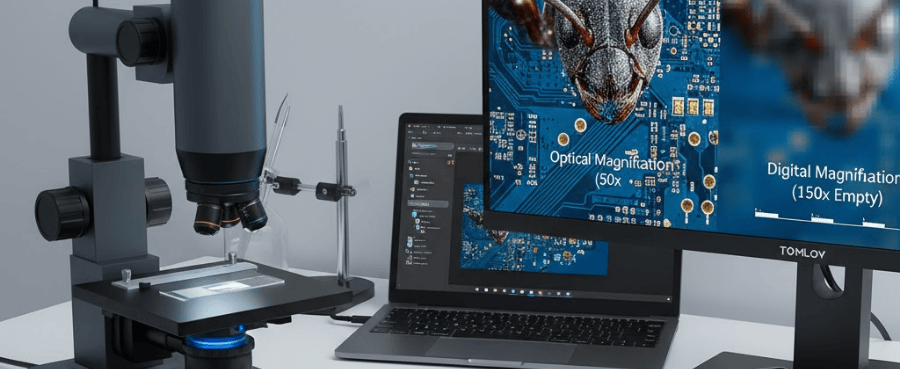
Optical magnification enlarges the image before it reaches the sensor. Digital zoom enlarges or interpolates pixels after capture. Digital zoom can make a feature easier to see on screen, but it does not necessarily reveal new specimen detail.
Likewise, more megapixels do not automatically mean more magnification. Pixel count can influence sampling, capture size and cropping flexibility, while useful detail still depends on the optics, sensor, focus and lighting. Read how megapixels affect digital microscope images for a fuller explanation.
Magnification vs Resolution
Magnification describes how large something appears. Resolution describes whether two nearby details can be distinguished. Enlarging a blurry or under-sampled image creates empty magnification: the image becomes bigger without revealing additional information.
Useful detail is limited by factors such as:
-
lens quality and numerical aperture;
-
sensor sampling and pixel size;
-
focus accuracy and working distance;
-
lighting and contrast;
-
vibration and image processing.
For a broader explanation of useful optical enlargement, see microscope magnification explained.
Use a Scale Bar When Sharing Microscope Images
An on-screen magnification value can become incorrect when someone views the image on a different monitor, changes browser zoom or prints it at another size. A calibrated scale bar is more reliable because it remains proportional when it is resized together with the image.
Calibrate measurement software for each relevant lens setting and working distance. Changing the optical geometry can invalidate an earlier pixels-per-millimeter calibration.
Common Magnification Calculation Errors
-
Mixing millimeters, micrometers and nanometers without converting them.
-
Measuring the whole image instead of the feature being evaluated.
-
Using a monitor’s diagonal specification as the physical image width.
-
Measuring a screenshot rather than the final physical display.
-
Ignoring software cropping, stretching or fit-to-screen scaling.
-
Treating digital zoom as added optical resolution.
-
Assuming the same on-screen magnification on every display.
-
Changing the working distance or lens setting after calibration.
Frequently Asked Questions
What is the formula for microscope magnification?
For an image, magnification equals image size divided by actual specimen size. For a compound microscope, total optical magnification normally equals objective magnification multiplied by eyepiece magnification.
How do you calculate actual size under a microscope?
Divide the measured image size by magnification. Convert the image measurement and desired actual-size result to compatible units before calculating.
Does a larger monitor increase microscope magnification?
It increases physical on-screen magnification when the image occupies more physical screen area. It does not increase the optical information captured by the lens and sensor.
Can megapixels determine magnification?
No. Megapixels describe pixel count, not optical or physical screen enlargement. They can affect sampling and cropping flexibility, but they do not provide a magnification value by themselves.
Is digital zoom the same as optical magnification?
No. Optical magnification is created before capture by the lens system. Digital zoom enlarges the captured pixels and may not add new resolved detail.
Why does advertised digital microscope magnification vary?
Some figures combine optical enlargement, digital zoom and assumed display enlargement. Unless the screen size and viewing conditions are defined, a single on-screen magnification claim cannot be reproduced reliably.
Final Answer
To calculate microscope image or on-screen magnification, measure a feature in the final image and divide that measurement by the feature’s real size, using the same unit for both. To calculate actual size, divide image size by magnification. For reproducible on-screen results, record the lens setting, working distance, digital zoom, crop, viewing-window size and display dimensions. When sharing images, include a calibrated scale bar instead of relying only on a magnification label.


Laisser un commentaire
Tous les commentaires sont modérés avant d'être publiés.
Ce site est protégé par hCaptcha, et la Politique de confidentialité et les Conditions de service de hCaptcha s’appliquent.