

Table of Contents
A WiFi microscope is a small digital microscope with a built-in camera that streams a live close up view to your phone or tablet. If you are shopping for one, the confusing part is not the definition, it is figuring out which models are actually clear, stable, and easy to set up. This guide breaks down how WiFi microscopes work and what to check before you buy.
What Makes a Microscope “WiFi” Instead Of Just Digital
It Creates a Wireless Link Between Then The Microscope And Your Screen
The microscope is doing two jobs: magnifying and acting like a little camera. The WiFi part is just how that camera talks to your device.
In real life, the experience usually looks like this:
1.Turn the microscope on
2.Connect your phone to the microscope’s WiFi (or your home network)
3.Open an app
4.You see a live view and can take photos or videos
Scenario: You are looking at a coin and you finally catch the tiny mark you were trying to find. You tap “photo,” and now you have proof you can zoom in on later without trying to hold your breath and keep your eyes steady.
You Will See Two Connection Setups Most Of The Time
Most models use one of these approaches:
Direct Connect (Hotspot Mode)
The microscope broadcasts its own WiFi signal. Your phone connects straight to it. This is common, and it is usually the easiest.
When it feels best: quick sessions at a desk, kitchen table, or workbench.
Network Connect (Router Mode)
The microscope joins your home WiFi. Your phone connects like normal. This is more common for classroom style setups or “leave it on a station” use.
When it feels best: you want people in the same space to view it more easily, and you do not want to switch WiFi networks every time.
Suggested insertion point: a tiny “Setup Reality Check” checklist
-
Does it work without internet
-
Does it need an account
-
How many steps from power on to live view
-
Can you save photos to your camera roll easily

When a WiFi Microscope Is Actually The Right Tool
It Makes Sharing The View Way Easier
This is the biggest “oh, I get it” moment. A WiFi microscope turns solo viewing into a shared screen.
Scenario: A kid finds something in the backyard and wants to see it bigger. With a WiFi microscope, you are not taking turns at an eyepiece. You just put it under the lens and both look at the tablet.
It Is Great When You Want Quick Photos And Video
If you are using it for documenting tiny details, WiFi microscopes are convenient because capturing is built in. You do not need to rig a phone camera to an eyepiece.
Scenario: You are doing a small repair and want a before and after photo of a damaged contact or cracked plastic. It becomes a quick tap instead of a mini photography project.
It Helps Keep Your Hands Free
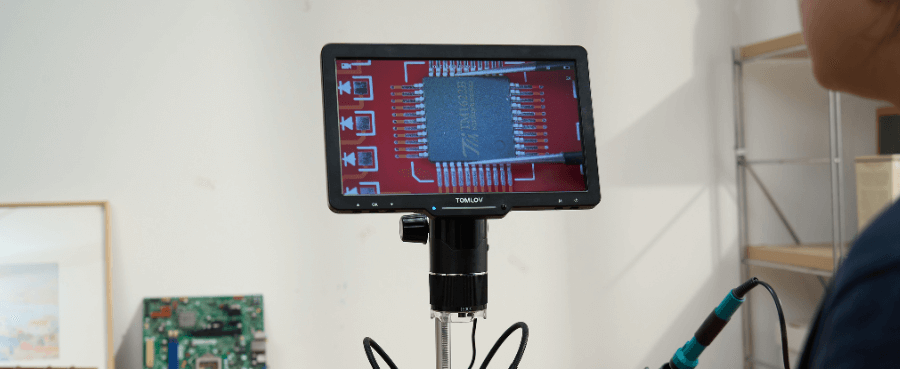
For inspection and hobbies, being able to watch the screen while you move the object is a real win. This matters a lot for electronics or any tiny part work.
Scenario: You are checking a connector pin. You can adjust the part while watching the screen instead of trying to line up your eyes and the lens at the same time.
Related Reading: What is a 3D digital microscope?
The Confusing Part: WiFi Microscope Versus USB Microscope Versus Phone Clip On
WiFi Versus USB Comes Down To Your Setup Style
A USB microscope is usually “plug into laptop, open software, done.” It is often stable and boring in a good way.
A WiFi microscope is “turn on, connect, open app.” It is cleaner on a crowded desk and easier with a tablet, but it depends more on the app experience.
Pick WiFi if:
-
You want to use a phone or tablet as your main screen
-
You hate cables on your workspace
-
You want portability
Pick USB if:
-
You are fine using a laptop
-
You want less setup drama
-
You plan to use it for long sessions
Suggested insertion point: a small comparison table
Best For / What You View On / Setup Feel / Typical Headaches
Phone Clip On Lenses Are Fun But Not A Replacement
Clip on lenses are fine for casual close ups, but they are hard to keep steady and they do not give you a controlled setup. A WiFi microscope usually wins for inspection because the stand and lighting matter.
If your goal is “I want to see this tiny thing clearly,” stability beats convenience.
What Matters Most When You Buy One
Image Clarity Is More Important Than The Biggest Magnification Number
A lot of listings lead with huge magnification numbers. In real use, you will care more about whether the image looks crisp and readable.
How to shop smarter:
-
Look for real sample photos or video, not just spec sheets
-
Pay attention to whether details look sharp at the distance you would actually use
-
If reviews mention “blurry unless perfectly positioned,” take that seriously
Working Distance Can Make Or Break Your Use Case
Working distance is the space between the lens and the object when it is in focus.
This matters because:
-
For electronics, you need room to move parts or tools
-
For collectibles, you need enough clearance to avoid bumping the lens
-
For kids, a forgiving focus range saves a lot of frustration
Quick self test: If you plan to use your hands under it, do not buy a microscope that forces the lens right on top of the object.
The Stand And Lighting Are The Quiet Deal Breakers
This is where people get disappointed. A shaky stand makes everything look worse. Harsh LEDs can create glare and wash out detail.
What to look for:
-
A heavier base or a stand that does not wobble
-
Brightness control
-
A setup that holds position without drifting
Scenario: You think the microscope “is not sharp,” but really the stand is vibrating every time you touch the table.
Suggested insertion point: a short “No Regrets” checklist
-
Stand feels solid
-
Brightness is adjustable
-
Focus feels smooth, not jumpy
-
You can capture and save images easily

Make Sure It Will Work With Your Phone Before You Fall In Love With The Listing
App Quality Is A Bigger Deal Than People Expect
Many “bad microscope” reviews are really “bad app” reviews.
Before you buy, check:
Is the app updated recently
Do reviews mention your phone type or OS
Are people complaining about disconnects or saved photos disappearing
Expect Some Lag And Decide If That Matters To You
For still photos, a little lag is usually fine. If you are trying to do precise hand movements while watching the screen, lag can feel annoying.
If your use case is hands on work, prioritize models reviewers call “stable” over models that just claim big specs.
Final Thoughts
A WiFi microscope is a small digital microscope that streams a live close up view to your phone or tablet. If you want easier viewing, easier sharing, and quick photo or video capture, it can be a great buy. Just do not shop by magnification hype. Shop by clarity, working distance, stand stability, lighting control, and app reliability. That is what decides whether you love it or abandon it in a drawer.


Laisser un commentaire
Tous les commentaires sont modérés avant d'être publiés.
Ce site est protégé par hCaptcha, et la Politique de confidentialité et les Conditions de service de hCaptcha s’appliquent.