
Table of Contents
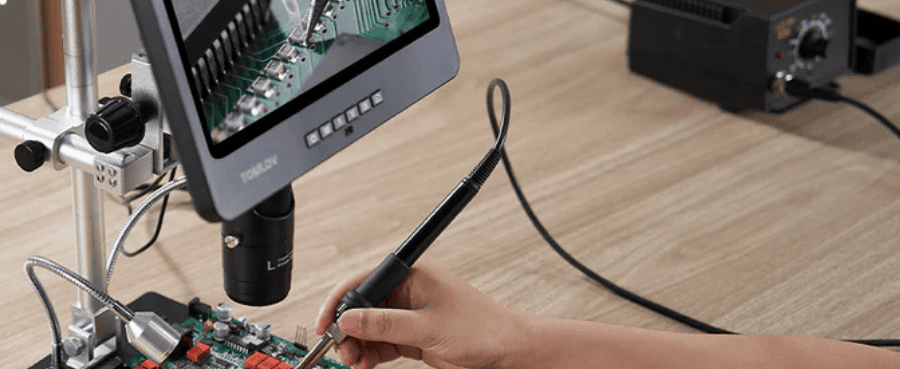
Choosing a digital microscope for soldering can feel overwhelming because there are so many specs and options to compare. In reality, only a few core features determine how clearly and comfortably you can work. This guide highlights those essentials and helps you select a digital microscope that supports your soldering tasks, whether you are working on hobby projects, repairs, or professional lab work.
Key Features to Consider in Digital Microscopes for Soldering
Resolution and Sensor Quality
A digital microscope’s resolution determines how much detail you can see during soldering and inspection. For micro-joints, tiny connectors, and surface defects, clarity matters more than theoretical pixel numbers. A higher-resolution microscope helps you identify issues like oxidation, heat-stressed pads, or incomplete solder flow, which may be hard to detect with the naked eye.
A 4K digital microscope produces exceptionally sharp images, making it easier to document repairs or inspect miniature SMD components. Meanwhile, a well-calibrated 1080p microscope equipped with good lighting can still deliver outstanding day-to-day performance. What truly elevates image quality is a clean, low-noise sensor with realistic color accuracy. This helps you visually distinguish between healthy solder joints and problematic ones without second guessing.

Magnification and Working Distance
High magnification looks impressive on paper, but excessive zoom often shrinks your working space. When soldering, you need both detail and room for your soldering iron, tweezers, hot-air gun, and PCB.
Most users prefer digital microscopes offering a 10×–50× magnification range. This provides enough clarity to inspect fine-pitch components without sacrificing comfort. Equally important is working distance. A gap of 6–8 inches between the lens and the board gives you flexibility to move your hands naturally. A microscope with smooth zoom control allows you to quickly shift between soldering and inspecting your results.
Depth of Field and Focus Stability
Depth of field controls how much of the image remains in focus at the same time. When working on a PCB with varying component heights, a shallow depth of field forces constant refocusing, which interrupts your workflow.
A good digital microscope maintains a deep depth of field so surrounding pads, traces, and SMD packages stay visible and sharp. Fine-focus control—whether manual or electronic—helps you adjust precisely when dealing with micro components. Pair this with a solid mounting system or boom arm, and your view remains stable even during tool movement.
Live Video Smoothness and Latency
If you solder while looking at a screen, latency becomes one of the most important factors. Any delay between your hand movement and what you see on the display can make precise work more difficult.
HDMI digital microscopes tend to provide the lowest latency with crisp real-time feedback. Frame rates in the 30–60 fps range offer smooth motion that makes small adjustments easier to track. Users who rely on USB connectivity should look for UVC-compatible digital microscopes, which work seamlessly with modern laptops and require no driver installations.
Related Reading: How To Use A Digital Microscope
Lighting and Glare Control
Reflective solder joints can create blown-out highlights that hide cracks, bridges, or cold joints. Because of this, lighting is just as important as resolution.
Digital microscopes with adjustable ring lights give you control over brightness and direction. Diffusers soften harsh reflections, while polarizing filters reduce glare and reveal hidden imperfections. Consistent lighting helps maintain visual clarity across different types of boards, including matte surfaces and lead-free solder joints.
Mounting, Stability, and Workspace Comfort
Even the most advanced digital microscope becomes frustrating if the stand is unstable or blocks your tools. A solid mounting system helps you maintain a clear view throughout the soldering process.
Boom arms and articulating arms are popular because they allow you to reposition the microscope without disturbing your workspace. A weighted or screw-down base adds stability, reducing the chance of unintentional movement. If your bench is crowded, compact digital microscope stands help you maintain an organized and efficient soldering station.
Software and Measurement Tools
Digital microscopes that include measurement features, annotation tools, and one-touch image capture are extremely helpful for documentation, QA tasks, or online repair tutorials.
Good software should feel intuitive. Simple menus, accurate measurement overlays, and easy file exporting help streamline your inspection workflow. Many modern digital microscopes also support plug-and-play operation, making them accessible even to beginners.

Comparing Different Types of Digital Microscopes
Entry-Level Digital Microscopes
These are great for beginners, hobbyists, or makers working on lightweight soldering tasks. They typically offer basic magnification, USB connectivity, and enough resolution for hobby-grade work.
Mid-Range HDMI Digital Microscopes
Ideal for repair technicians who need smooth, low-latency video for active soldering. These models often include better optics, stronger stands, and higher frame rates.
Professional Laboratory Digital Microscopes
These are built for high-precision inspection, QA environments, and advanced repair. They commonly feature 4K imaging, calibration support, premium lighting, and rugged construction designed for continuous use.
Choosing the Right Digital Microscope Based on Your Use Case
Hobbyists and Makers
A solid 1080p or entry-level 4K digital microscope with decent lighting and magnification is usually sufficient. Look for a model that is easy to set up, budget-friendly, and compatible with your existing tools.
Repair Technicians
For daily soldering work, prioritize low-latency HDMI output, stable mounting hardware, and strong depth of field. These features directly influence speed, comfort, and accuracy when repairing smartphones, laptops, or game consoles.
Professional Labs and QA Teams
In professional environments, consistency and traceability matter. A high-resolution 4K microscope paired with calibrated measurement tools and controlled lighting ensures reliable inspection and documentation.
Frequently Asked Questions
Can I use a digital microscope for both soldering and post-inspection?
Yes. A digital microscope with adjustable magnification and the right working distance can handle both tasks easily. Many users switch between soldering and close-up inspection without changing equipment.
Can digital microscopes handle high temperatures near soldering stations?
Most digital microscopes tolerate normal ambient temperatures generated during soldering. However, avoid placing the camera directly above active hot-air tools. Choosing a microscope with a longer working distance also helps protect the optics.
Final Thoughts
Choosing the best digital microscope for soldering becomes much easier once you know which features truly matter. High-quality resolution, a comfortable working distance, solid depth of field, stable mounting, and good lighting all contribute to clear, confident, and precise soldering. Whether you're a hobbyist, technician, or part of a professional lab, the right digital microscope enhances visibility, reduces fatigue, and improves the overall quality of your work.



Laisser un commentaire
Tous les commentaires sont modérés avant d'être publiés.
Ce site est protégé par hCaptcha, et la Politique de confidentialité et les Conditions de service de hCaptcha s’appliquent.