
Table of Contents
Choosing between a handheld and a stand-mounted digital microscope completely alters how you interact with your specimens. While both utilize digital camera sensors to provide high-definition magnification, their physical designs cater to entirely different environments and tasks. This guide compares their stability, portability, and practical applications to help you invest in the right optical tool.
Handheld and Stand-Mounted Microscopes Explained
Understanding the core design philosophy of both styles is essential before deciding which fits your workflow. The physical structure dictates exactly how you will handle the lens, focus the image, and illuminate your subject.
How a Handheld Digital Microscope Works
A handheld digital microscope packs the camera sensor, objective lens, and LED lighting into a single, compact unit designed to be gripped in the palm of your hand. Many modern models feature a small, integrated LCD screen directly on the chassis, while others wirelessly broadcast their video feed to a smartphone or tablet. You operate it by physically hovering the device over an object or pressing its clear plastic lens hood directly against a surface.
How a Stand-Mounted Digital Microscope Works
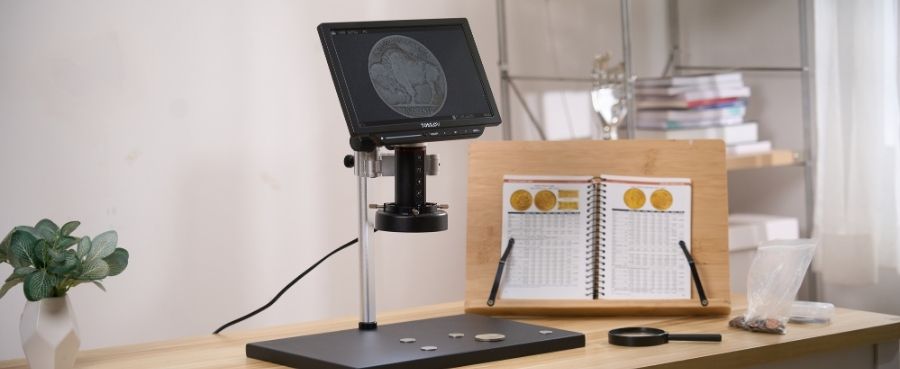
This setup mounts a digital camera module onto a rigid vertical column attached to a heavy, weighted base. The camera is locked into a bracket that slides up and down the column via mechanical rack-and-pinion gears. Instead of moving the camera with your hands, you place your specimen on the baseplate and turn precise mechanical knobs to adjust the focal distance.
Key Differences at a Glance
|
Feature |
Handheld Digital Microscope |
Stand-Mounted Digital Microscope |
|
Primary Advantage |
Ultimate portability and maneuverability |
Absolute physical stability and precision |
|
Focus Mechanism |
Manual distance adjustment by hand |
Geared rack-and-pinion knobs |
|
Working Distance |
Nearly flush with the object |
Several inches of clearance |
|
Hands-Free Operation |
No (requires one hand to hold) |
Yes (both hands remain free) |
|
Best For |
Fieldwork, large objects, rapid checks |
Micro-soldering, coin grading, long sessions |
Compare Image Stability and Ease of Use
Magnification amplifies the slightest physical movements, making mechanical stability a critical factor in image quality. How the microscope is supported directly impacts your ability to achieve and maintain a razor-sharp focus.
Stability During Close Inspection
Handheld microscopes suffer inherently from motion blur. Human hands naturally tremble, and at 50x or 100x magnification, a millimeter of vibration causes the image to shake violently on the screen. Stand-mounted microscopes eliminate this completely. The heavy base and rigid column lock the camera sensor perfectly still, ensuring crystal-clear, professional-grade photographs.
Focus and Magnification Control
Focusing a handheld unit is a balancing act; you must hold the device at the exact right distance while simultaneously rolling a small focus wheel with your thumb, which often pushes the camera out of alignment. Stand-mounted units isolate these actions. You set the camera height precisely using the geared column knobs, leaving the camera perfectly stable while you dial in the fine optical focus.
Comfort During Longer Sessions
Holding a device steady for an hour causes significant muscle fatigue in your hands and neck. Stand-mounted microscopes are highly ergonomic. You can sit comfortably in a chair, adjust the screen angle to eye level, and observe specimens for hours without experiencing physical strain.
Compare Portability and Workspace Needs
Where you intend to observe specimens heavily influences your equipment choice. Your physical environment determines whether you need a stationary setup or a portable optical tool.
Using a Microscope Away From a Desk
Handheld models dominate in the field. Equipped with internal rechargeable batteries, they can be thrown into a backpack and taken to a flea market to inspect jewelry, into the backyard to examine insects, or onto a factory floor for spot checks. Stand-mounted units require a flat, stable surface and are difficult to transport safely without dismantling the column.
Working With Large or Fixed Objects
Stand-mounted models are physically restricted by their column design; you can only inspect objects small enough to fit onto the baseplate. Handheld microscopes have zero size restrictions. You can press a handheld unit against a massive boulder, use it to read micro-printing on a heavy machine engine, or scan across the surface of a large oil painting without moving the artwork.
Setting Up a Dedicated Inspection Area
If you are building a permanent workbench for repairs or hobbies, a stand-mounted microscope creates a highly efficient, ready-to-use workstation. It stakes a permanent footprint on your desk, meaning your lighting, focal plane, and recording equipment are always perfectly aligned and ready the moment you sit down.
Choose Based on What You Inspect
The physical characteristics of your specimens dictate the necessary optical approach. Matching your subject matter to the right microscope style prevents constant mechanical frustration.
Coins, Stamps, Electronics, and Small Parts
Stand-mounted models are the undisputed champions for these items. Grading a coin requires careful rotation under the light, which is impossible if one hand is busy holding the camera. The stand keeps the camera fixed while you use both hands to angle the coin or sort through a collection of stamps.
Plants, Fabrics, Rocks, and Outdoor Objects
Handheld models excel at observing nature and raw materials. You can easily press the lens hood directly against a living leaf without snapping the stem, or slide it across a stretched piece of fabric to inspect the weave without needing to cut a small sample to fit under a microscope stand.
Soldering, Repair, and Detailed Bench Work
Micro-soldering and watch repair require extreme precision and space for hand tools. A stand-mounted microscope is strictly mandatory here. You must have both hands completely free to operate tweezers and a hot soldering iron, and you rely on the stand's vertical column to provide the 3 to 5 inches of working distance required to maneuver your tools safely under the lens.
Decide Which Features Matter Most
Beyond the basic form factor, specific hardware capabilities will limit or expand what you can accomplish. Evaluating these secondary features ensures your microscope handles your specific technical requirements.
Screen Size and Viewing Options
To remain pocket-sized, handheld microscopes usually feature small 2-inch to 4-inch screens, or they rely on a Wi-Fi connection to your smartphone. Stand-mounted units act as true desktop monitors, often featuring massive 7-inch to 10.1-inch IPS displays or dedicated HDMI output ports for zero-latency viewing on external televisions.
Stand Height and Working Distance
If you choose a stand-mounted model, the height of the vertical column is the most critical specification. A short stand is fine for flat coins, but repairing electronics requires a taller stand (or an upgradeable extension tube) to ensure the lens sits high enough to keep your tools in focus.
Lighting, Recording, and Connectivity
While both styles feature built-in LED ring lights, stand-mounted units often integrate flexible, dual gooseneck side-lights into the base to eliminate shadows on 3D objects. Both styles can record photos and videos to a MicroSD card, but stand-mounted units frequently include wireless remote controls, allowing you to snap a photo without physically touching the camera and causing vibrations.
Which Digital Microscope Should You Buy?
Consolidating your primary needs will point you clearly toward the correct form factor. Your final choice hinges on whether mobility or absolute precision is your highest priority.
Choose Handheld for Portability and Quick Checks
If you want an accessible, highly portable device to share with children, take on nature hikes, or carry to antique shops for rapid surface inspections, a pocket-sized unit is ideal. The TOMLOV P10 2" LCD Digital Microscope provides excellent on-the-go magnification with a built-in screen, making it incredibly easy to pull out and use anywhere without setup.
Choose Stand-Mounted for Precision and Stability
If you are setting up a permanent hobby desk for coin collecting, circuit board repair, or detailed engineering inspections, you must prioritize stability and ergonomics. A robust desktop model like the TOMLOV DM9 7" LCD Digital Microscope offers the rock-solid aluminum stand, precise geared focusing, and large integrated display necessary for executing delicate, hands-free work over long periods.
Consider a Detachable Design for Both Uses
You do not always have to compromise. Many high-quality stand-mounted digital microscopes feature a modular design where the central camera barrel is held in the bracket by a simple tension screw. By loosening this screw, you can remove the camera from the base entirely, allowing you to use it as a handheld device for large objects, then lock it back into the stand when you need absolute precision.
Final Thoughts
Your perfect digital microscope is the one that seamlessly integrates into your daily routine. Stand-mounted models deliver the unwavering stability and hands-free freedom required for precision repairs and detailed numismatics. Conversely, handheld models strip away the bulk, offering unparalleled freedom to explore the microscopic details of the world exactly where you find them. By clearly defining where you will work and what you need to hold, the choice between stability and mobility becomes clear.
Frequently Asked Questions
Can You Use a Stand-Mounted Digital Microscope by Hand?
Yes, in many cases. Most standard digital microscopes feature a cylindrical camera module that is clamped into the stand's focusing ring. By unscrewing the clamp, you can slide the camera module out and hold it by hand to inspect large objects that will not fit on the baseplate.
Is a Handheld Digital Microscope Good for Soldering?
No. Soldering requires absolute precision, zero video latency, and the use of both hands simultaneously. A handheld microscope occupies one of your hands and constantly suffers from motion blur, making it unsafe and highly impractical for guiding a hot soldering iron.
Which Type Is Better for Beginners?
For young children or casual hobbyists exploring the outdoors, a handheld unit is highly intuitive and fun. For adults or teenagers looking to seriously pursue coin collecting, biology, or electronics, a stand-mounted model is better because it removes the frustration of motion blur and makes focusing much easier.



Laisser un commentaire
Tous les commentaires sont modérés avant d'être publiés.
Ce site est protégé par hCaptcha, et la Politique de confidentialité et les Conditions de service de hCaptcha s’appliquent.