
Table of Contents
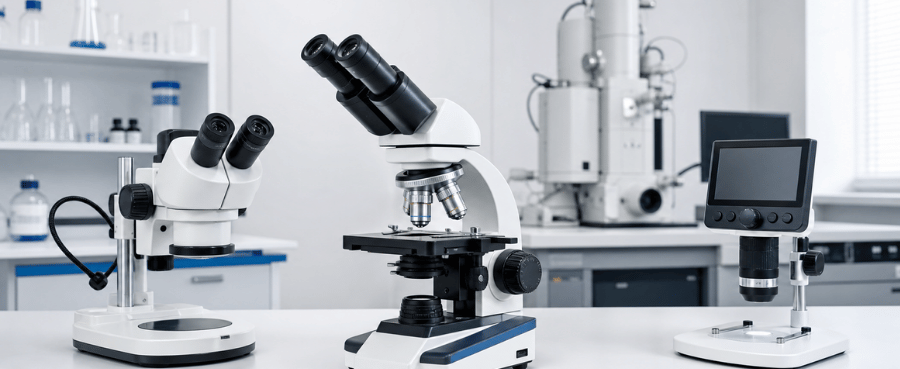
The right microscope is determined by what you want to observe, not by the largest magnification number on the box. Choose a compound microscope for thin, transparent slides; a stereo microscope for low-power three-dimensional work; and a digital inspection microscope for coins, circuit boards and other opaque surfaces.
This guide walks through the decision in the order that matters: specimen type, required detail, illumination, working distance, viewing method and recording needs.
Choose by Specimen First
Start with the object rather than the microscope specification. Transparent specimens and opaque objects require different optical paths.
-
Cells, pond water and prepared slides: compound transmitted-light microscope.
-
Insects, rocks, mechanical parts and dissection: stereo microscope.
-
Coins, solder joints, jewelry and surface inspection: digital inspection microscope.
-
Images that must be recorded or shared: digital microscope or optical microscope with a camera.
A compound microscope uses light transmitted through a thin specimen. A stereo or inspection microscope normally illuminates the surface from above. Our guide to what a compound microscope is explains why these systems are not interchangeable.

The Main Types of Microscopes
Compound Microscope
A compound microscope commonly uses 4x, 10x, 40x and 100x objectives with a 10x eyepiece, producing 40x to 1000x total magnification. It is the best general choice for cells, microorganisms and prepared biological slides. Look for fine focus, transmitted illumination, a mechanical stage and an adjustable condenser or diaphragm.
Stereo Microscope
A stereo microscope provides a lower-power view with depth perception and a generous working distance. It is better for manipulating insects, rocks, circuit boards and components with tools. It is not designed for viewing individual cells at 400x.
Digital Microscope
A digital microscope displays the image on an LCD, computer or external monitor. It is convenient for documentation, group viewing and ergonomic inspection. Many consumer digital models are surface microscopes, so check lighting direction, working distance and real sample images before buying.
For a detailed comparison, see digital vs. optical microscopes.
How Much Magnification Do You Actually Need?
-
10x–50x: whole insects, rocks, components and large surface features.
-
20x–200x: coins, solder joints, fibers and fine surface inspection.
-
40x–100x total: locating specimens and viewing broad tissue structure.
-
400x total: many cells and larger microorganisms.
-
1000x total with a proper oil objective: small structures requiring high numerical aperture.
Magnification without resolution only enlarges blur. Check the objective, numerical aperture, lens quality, sensor, lighting and stability instead of relying on a four-digit marketing claim.
Lighting and Working Distance
Transparent slides need transmitted light from below. Opaque objects need reflected, ring or side lighting from above. Shiny coins and circuit boards also benefit from adjustable side lights because a ring light can create glare.
Working distance is the gap between the lens and specimen when focused. Soldering and repair need enough room for tools and hands. A short working distance may be acceptable for flat inspection but frustrating for active work.

Eyepiece or Screen?
An eyepiece provides a direct optical view with no screen latency. A screen is more comfortable for demonstrations, documentation and long inspection sessions. Screen size changes how large the image appears, but it does not create additional captured detail.
If you value recording and shared viewing, a digital model may be a better fit. If you need direct optical quality for biological slides, a compound optical microscope is usually the safer starting point.
Features Worth Paying For
-
Stable metal stand or rigid frame.
-
Fine-focus control at higher magnification.
-
Lighting that matches the specimen type.
-
Mechanical stage for slide work.
-
Adequate working distance for tools.
-
Low-latency HDMI or wired output for hands-on inspection.
-
Real sample images rather than only maximum specifications.
The digital microscope buying guide explains these specifications in more detail.
Common Buying Mistakes
-
Buying by maximum magnification alone.
-
Choosing reflected light for transparent slides.
-
Ignoring stand vibration and working distance.
-
Assuming megapixels can compensate for weak optics.
-
Buying a stereo microscope for high-power cellular work.
-
Choosing a compound microscope for soldering with tools beneath the lens.
Frequently Asked Questions
What microscope is best for beginners?
Choose according to the first specimens you plan to observe. A student compound microscope is suitable for slides and pond water; an LCD digital microscope is easier for coins, insects and circuit boards.
Is 1000x magnification necessary?
Not for most hobby tasks. Many surface-inspection jobs need less than 200x, while many classroom cell observations use up to 400x. A true 1000x compound view normally uses a 100x oil-immersion objective.
Are digital microscopes any good?
Yes, when screen viewing, recording and surface inspection match the task. They are not automatically a replacement for compound or stereo microscopes. Read our honest assessment of whether digital microscopes are worth it.
Final Decision
Choose a compound microscope for transparent biological slides, a stereo microscope for low-power three-dimensional manipulation, and a digital inspection microscope for screen-based examination of opaque surfaces. After choosing the correct type, compare optics, illumination, focus, stability and working distance before comparing headline magnification.



Leave a comment
All comments are moderated before being published.
This site is protected by hCaptcha and the hCaptcha Privacy Policy and Terms of Service apply.